Vier Box for Amibroker (AFL)
gg over 16 years ago Amibroker (AFL)
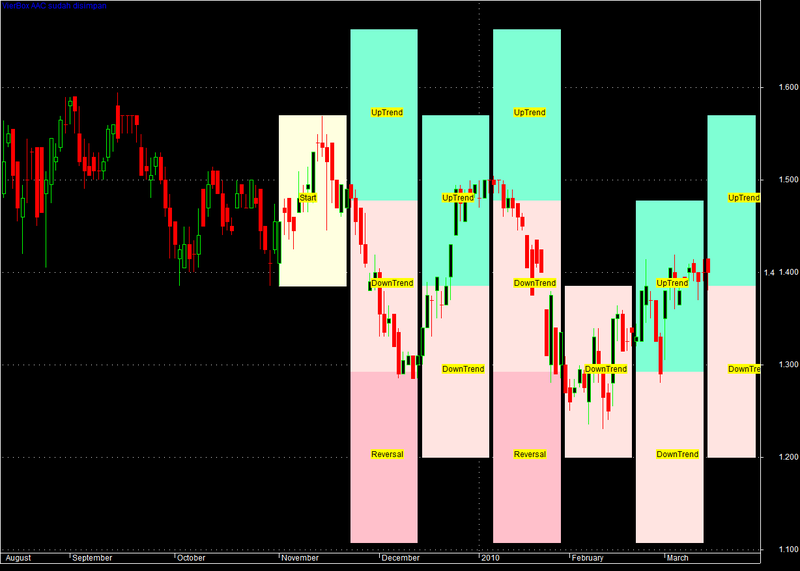
It has been observed that most of the technical anlysts are bogged down with series of indicators and hardly have time to trade. I call it “complexomenia” with “analysis & paralysis” symptom. Answer to it is viered box which gives pictoral presentatin about market direction, trend strength aon a continues basis and free us for undertaking actual trade.
Screenshots
You cannot view the code for the following reasons:
- You must be a member.
22 comments
Leave Comment
Please login here to leave a comment.
Note that it didn’t work for me when i first applied it but scrolling the chart fixed it.
Hi Admin,
I am getting following error message.
You must not access array elements outside 0.. (BarCount-1) range.
Please advise.
Thanks
Amruta
Hello amruta
This is just a badly coded indicator. You will need to fiddle with the parameters.
Hi Admin,
Would you please tell me, how this to optimize : Offset = Param( “Start Mundur Berapa Bar?”, 75, 1, 200 ); and jumlahBarDiBox = Param( “Jumlah Bar di Box”, 15, 5, 20 );. It’s important to me. Thx before.
Rgds,
Iwan
Hello
Just change Param to Optimize and add 1 at the end of each as a parameter ie.
Hello Admin,
Thank you for answer, I’ve changed my afl, especially the same as your instruction, but I’m sorry just still not work. Would you please send me this Afl with completed optimized ? I really need this afl. Many thank’s for your attention.
Rgds,
Iwan.
Pak Vier, terima kasih atas kontribusi AFL-nya. Saya sdh mempelajari cara memakai AFL Bpk, hanya saya belum mengetahui cara menggunakan ke fungsi “Explorer”. Bersediakah Bpk berbagi ilmu sekali lagi : Bagaimana cara memfungsikan explorer (scan)- nya ? Sebelumnnya saya ucapkan terima kasih.
Rgds,
Iwan.
Hi Admin,
I’m sorry, after a few days ago I’v not answer as my question, may I repeat again, would you please tell me, the address / mail who is send this AFL. I want to contact him about this AFL. Thank you.
iwan, that is against our privacy policy.
Not working!
Please, fix it!
I want to plot the Base line support in a rectangular formation with solid colour fill up in that box. Can anybody write the afl ? Thnxs in adv.
To make it functional and adjustable;
In “VierBox by DF”,
replace
Offset = Param( “Start Mundur Berapa Bar?”, Offset, 1, 200 );
with
Offset = Param( “Start Mundur Berapa Bar?”, 200, 1, 200 );
In “Parameters” , in “Start Mundur…”, you can change 200 in other timeframes.
dear @admin sir,
can you please make this formula working please. It ain’t working.
would really aprreciate your effort and time sir.
very grateful of your work sir.
thanks
I have tried the formula and didn’t see any problems.
@admin sir it is showing error 29 on LN;410, COL; 32
variable ‘jumlahboxv’ used without having been initialized.
Try opening the parameters window and playing with ‘Start Mundur Berapa Bar?’ and ‘Jumlah Bar di Box’ parameters.
okay sir.
and @admin any help regarding this sir ???
http://www.wisestocktrader.com/indicators/5601-v-bottom
@chetan
Change below line
Offset = Param( "Start Mundur Berapa Bar?", Offset, 150, 200 );@ocil
still not working sir.
dear @ocil sir can you please do me a favour and help me with this
http://www.wisestocktrader.com/indicators/5601-v-bottom
i’ll really appreciate your time and effort sir.
Selamat siang admin, mengapada bagian hArray dibilang error ya. Punya saya ga sengaja kehapus, lalu generate ulang, hasilnya malah error
terimakasih mohon bantuannya
macan mana ini pake nya ? wkwkkwkwkwkkw
Thank you for the AFL contribution. I’ve learned how to use AFL, only I don’t know how to use the “Explorer” function. Are you willing to share your knowledge once again: How do I enable the explorer (scan)? Thank You.